


Rock & Crystal Identifier App
4.7311.00 Reviews
App Specs
- Version
- 7.3.8
- Updated On
- License
- Free
- Downloads
- 100,000+
- Developer
- SL-Solutions
- Categories
- Education
- Platform
- Android
Screenshots
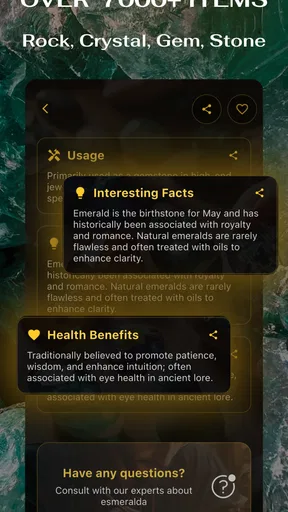
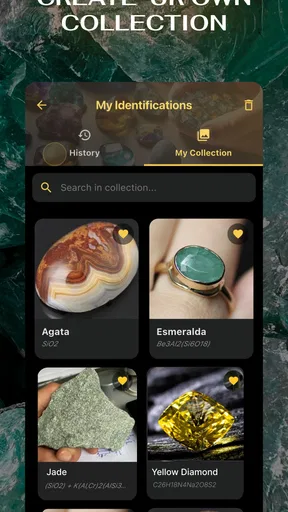
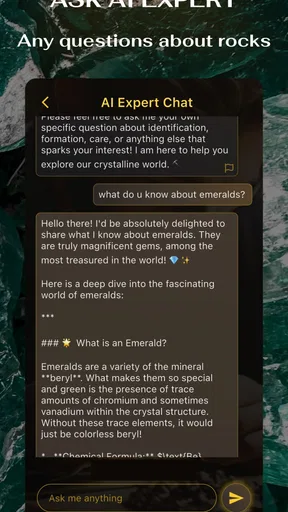
 Analysis by AppCompare
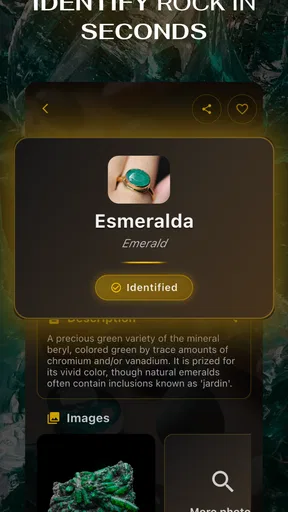
I like apps that turn a casual question into a small learning opportunity, and Rock & Crystal Identifier does exactly that when I am holding an unfamiliar stone. Its central idea is simple: I take a photo, point the camera at a specimen, and use the result as a starting point for identifying a rock, crystal, mineral, stone, or gemstone. That sounds narrow, but it becomes surprisingly useful when I am sorting finds from a walk, checking a piece from a collection, or trying to understand why two similar-looking stones are not actually the same.
Developed by SL-Solutions, this free educational app is aimed at Everyone and runs on Android devices using version 7.0 or later. I would describe it less as a replacement for a geologist and more as a quick visual reference that fits in a pocket. That distinction matters. The app can help me form a sensible first impression, but the quality of the answer depends heavily on the photograph, the visible surface, and how distinctive the specimen really is.
After spending time with it, my main conclusion is that the camera-based identification is most valuable as a learning shortcut, not as laboratory proof. It gives beginners a practical way into geology and gives experienced hobbyists a convenient second opinion. It is less suitable when the exact identity has financial, scientific, or safety consequences.
What the photo-identification capability really offers
The strongest part of the app is its focus. Instead of asking me to browse long mineral lists or compare dozens of technical descriptions, it lets me begin with the object in front of me. I can photograph a specimen or use the camera while examining it, then receive an identification-oriented result. That removes the biggest barrier for newcomers: not knowing which visual details are important enough to search for.
This is especially helpful with ordinary-looking material. A stone may have a faint band, a dull metallic patch, a glassy edge, or a pattern that is difficult to describe in words. Searching for “gray rock with tiny shiny spots” is frustrating because the wording is vague and the search results can be overwhelming. A visual tool gives me a more direct route from observation to a possible name.
Still, a photograph captures appearance rather than the complete identity of a mineral. Color can shift under warm indoor lighting, flash can make a dull surface look glossy, and a dusty specimen can hide the texture that separates one possibility from another. Even a very clear image may not reveal hardness, streak, density, cleavage, magnetism, or chemical behavior. I therefore treat the app’s answer as a shortlist or educational lead.
That approach is not a weakness unique to this app; it is the basic trade-off of visual identification. The benefit is speed and accessibility. The cost is that visually similar materials can remain difficult to separate. If I need certainty, I would still compare the result with a field guide and use simple physical observations, or ask someone with relevant expertise.
Worth Reading Before You Choose

EA SPORTS FC Mobile 26 Is a Bigger Football Game, but It Takes Time

Flipboard Shows What News Apps Must Do Beyond the Feed

Switching to Android Auto Means Rethinking Your Driving Routine

Google Calendar Makes a Crowded Week Easier to Manage

Ludo King Makes the Most of the Minutes Between Plans

Baby Panda World Brings Quick Play to Modern Phones, but Its Game Library Feels Busy
Why the camera-first approach is useful for beginners
For a new collector, terminology is often the first obstacle. Words such as luster, cleavage, matrix, translucence, and crystal habit are useful, but they are not intuitive when encountered in isolation. Starting with a real object makes those concepts easier to learn because I can connect a name to something I can hold and inspect.
The app also encourages a better question than “What is this?” I find myself asking, “Which visible clues led to this possibility?” That change in attitude is important. Rather than accepting a label immediately, I can look again at the grain, surface, color distribution, and shape, then decide whether the suggestion makes sense. Used this way, the tool becomes a prompt for observation.
Its educational category is a good fit because the experience is informal and approachable. I do not need prior geology knowledge to begin, and I can use it during a walk, at home, or while organizing stones collected on a trip. The free starting point also makes experimentation easier, although optional in-app purchases range from $8.99 to $59.99 per item, so I would check the purchase screen carefully before committing to anything beyond the basic experience.
How I get more dependable results in practice
The biggest improvement comes from treating the photo as a small documentation task rather than a quick snapshot. I get better results when the specimen fills most of the frame, the surface is in focus, and the lighting is even. A plain background helps me concentrate on the stone instead of surrounding objects. I also avoid placing a highly reflective piece directly under a harsh lamp, because bright glare can erase useful surface detail.
A useful workflow is to photograph more than one face. The first image may show color, while a side view reveals layering, crystal shape, or a broken edge. If the app allows me to work from the camera or a photo, I can choose the view that presents the most information rather than automatically using the prettiest angle. This is one of the less obvious advantages of a visual identifier: the quality of my input becomes part of the learning process.
I also keep the specimen’s context in mind. A stone found on a beach should be considered differently from one purchased as a polished decorative piece. A tumbled stone may have lost the natural features that would make identification easier. Likewise, a specimen covered in soil can produce a less useful result than the same piece after gentle cleaning. I would never damage a valuable or delicate sample just to improve a scan, but removing loose dirt can make the visible pattern clearer.
Another practical habit is to record the result instead of relying on memory. When sorting several similar pieces, I would note the suggested identity alongside where each specimen came from and what it looked like before polishing or handling. This prevents a common collecting mistake: mixing up stones after examining them one by one. The app is most helpful when it supports an organized process rather than being used as a one-tap guessing machine.
What to do when the result seems convincing
A confident-looking answer should still be checked against the specimen. I compare the suggested name with basic observations that do not require special equipment. Is the stone transparent, translucent, or opaque? Does it have a glassy, pearly, earthy, or metallic appearance? Are the visible lines actual layers, surface scratches, or reflections? Does the shape resemble natural crystal growth, or has cutting and polishing changed it?
I avoid presenting a visual match as proof of value. Gemstones in particular can look attractive without being rare, and a similar-looking imitation can be made from glass or another material. If a piece might be worth significant money, I would use the app only to learn possible terminology before seeking an independent assessment. That is a sensible boundary for any camera-based identification tool.
The same caution applies to collecting outdoors. An identification result should not be used to decide whether a mineral is safe to handle, ingest, heat, or place in water. The app helps with recognition and education; it is not a safety certification. Keeping that boundary clear makes the tool more useful, not less, because it prevents unrealistic expectations.
A realistic use case: sorting a weekend collection
My favorite scenario is a relaxed weekend walk followed by sorting the finds at home. I might return with several stones that look similar at first glance: one with pale bands, another with a sparkling surface, and a third that is dark but has a colored edge. Instead of searching each description separately, I can photograph them one at a time and use the suggestions to create an initial group.
The important part is not simply receiving a name. I use the results to decide what deserves closer inspection. One stone may appear more likely to be a quartz-related specimen, another may resemble a layered rock, and a third may remain uncertain. That is already useful because it tells me where to focus my reading. The app reduces the blank-page problem that often makes beginner research feel difficult.
For children, the same activity can become a supervised observation exercise. A child can make a guess before using the camera, compare that guess with the app’s suggestion, and then describe which visible feature caused the difference. Because the content rating is Everyone, the app is suitable for a broad audience, although an adult should still guide outdoor collecting and explain that the result is not guaranteed.
Teachers and hobby groups could use it as an opening activity rather than a final authority. Each person can photograph a specimen, write down the first impression, and then discuss why different stones are hard to distinguish from a picture. That turns the app’s uncertainty into a lesson about evidence. In my view, this is a stronger educational use than simply displaying a label and moving on.
It is also convenient for a collector who has inherited an unorganized box of stones. I would not expect the app to catalogue an entire collection automatically, but it can help break a large job into manageable sessions. I could separate obvious materials first, photograph the uncertain pieces, and then research only the names that repeatedly appear. That saves time compared with opening a reference book for every object.
Where it compares well with ordinary alternatives
A printed field guide remains better when I want to study identification methods in depth. Books encourage deliberate comparison and usually explain physical properties that a camera cannot see. They are also useful away from a signal or when I want a broader understanding of geological context. Their drawback is the learning curve: finding the correct section can be slow when I do not know whether I am looking at a mineral, a rock type, or a polished commercial specimen.
General web searches are flexible, but they often create too many possibilities. Image search can be helpful for visual comparison, yet it may mix natural specimens with jewelry, decorations, and synthetic lookalikes. Rock & Crystal Identifier gives me a more focused first step, especially when I cannot describe the object accurately.
Human communities and specialist forums can provide more nuanced feedback, particularly when a photograph includes scale, location, and multiple angles. The trade-off is waiting and preparing a clear question. I see this app as the fast stage before that conversation: it helps me learn the likely vocabulary so I can ask a better question instead of posting an uninformative picture with “What is this?”
Professional testing is the right alternative when certainty matters. If the identity affects a purchase, insurance decision, scientific record, or safety concern, a visual suggestion is not enough. The app can still help me understand what I may be looking at, but it should not replace appropriate verification.
Friction, limitations, and the cost decision
The main friction is the unavoidable ambiguity of photographs. A rough stone can contain several materials, and a polished surface can hide the features that distinguish it from a lookalike. Results may also be less useful when the specimen is tiny in the frame, poorly lit, partially covered, or photographed against a visually busy background. These are manageable issues, but they mean I have to participate in the process.
I would also be cautious about building a large collection around unconfirmed labels. Once a name is written on a box, it is easy to repeat it as fact. I prefer labels such as “possible” or “needs checking” until the appearance and physical properties agree. That small habit prevents the app from unintentionally turning an educated guess into permanent misinformation.
The purchase structure deserves attention as well. The app is free to install, while in-app items are listed between $8.99 and $59.99 each. That range is wide enough that I would use the free experience first, understand what is included, and decide whether the additional value matches my level of interest. A casual user who identifies a few vacation finds may not need to spend anything. A committed collector should still compare the cost with a good field guide or expert consultation.
The app has a 4.7 average from around 6.3 thousand ratings, with over 100 thousand installs and 311 written reviews. Those figures suggest that many people find the concept useful, but they do not remove the need to judge it against my own expectations. A high rating may reflect convenience and enjoyment, while my own requirement might be scientific certainty. I would not confuse those two standards.
SL-Solutions lists the current release as version 7.3.8. For me, the practical question is not the version number itself but whether the app behaves comfortably on my device and whether the camera produces clear images. Since it supports Android 7.0 and later, it is accessible to people using older compatible phones, though camera quality can vary considerably between devices. A modern camera is not essential, but good focus and lighting make a noticeable difference.
Who gets the most from this app
I think it is a strong match for beginners, families, casual collectors, students, and anyone who regularly encounters stones but does not yet know the vocabulary for describing them. It is also useful for experienced hobbyists who want a quick second opinion before opening a reference book. The best users will be curious and willing to check the suggestion instead of demanding certainty from one image.
It is less suitable for a buyer trying to authenticate an expensive gemstone, a researcher requiring a defensible identification, or anyone making a safety decision about an unknown material. Those users need testing, documentation, or expert review. The app may still be a convenient preliminary tool, but it should remain preliminary.
I would also skip it if my main goal is a complete geology course. The camera capability can spark interest, but identifying a specimen is not the same as learning how rocks form, how minerals are classified, or how field tests work. For deeper study, I would pair the app with a reliable guide and hands-on observation. That combination is more informative than either resource alone.
My recommendation is therefore fairly specific: install it if you want a fast, approachable way to turn an unknown stone into a research question. Take careful photos, inspect more than one surface, treat every result as a possibility, and keep valuable or safety-sensitive decisions outside the app’s authority. Used with those limits, Rock & Crystal Identifier makes casual stone collecting more engaging and gives beginners a practical path from curiosity to informed observation.
Pros
- Identifies many common rocks and crystals from a single photo.
- Simple interface makes it accessible to beginners and casual users.
- Useful reference for learning basic mineral characteristics and names.
- Fast results are convenient during outdoor collecting or museum visits.
- Can help organize and expand your personal rock and crystal knowledge.
Cons
- Photo accuracy may drop with poor lighting
- blur
- or partially hidden specimens.
- Similar-looking minerals can sometimes receive incorrect identifications.
- Some advanced information or features may require a subscription.
- The app may provide limited value for professional geological analysis.
- Results depend on the quality and variety of its identification database.
FAQs for Rock & Crystal Identifier App
What is the Rock & Crystal Identifier app used for?
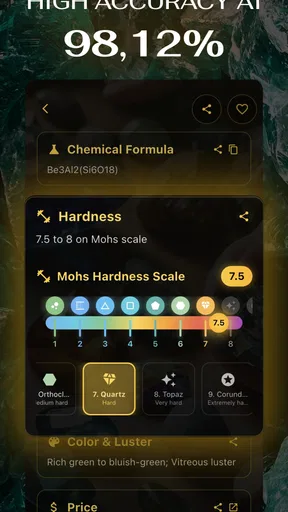
Rock & Crystal Identifier is designed to help users recognize rocks, minerals, crystals, and gemstones by analyzing photos taken with a phone or selected from the gallery. After submitting an image, the app typically provides a possible identification along with general information such as appearance, composition, common uses, or collecting notes. It is useful for beginners, students, collectors, and anyone curious about stones, although results should be treated as guidance rather than a professional geological assessment.
How accurate are the identifications provided by Rock & Crystal Identifier?
The app can be helpful when the photograph is clear, well lit, and shows the stone from a useful angle, but identification accuracy is not guaranteed. Many minerals have similar colors, textures, and crystal shapes, while lighting, reflections, dirt, and camera quality can affect the result. For valuable, rare, or potentially hazardous specimens, users should confirm the result with a geologist, mineral guide, laboratory test, or experienced collector before relying on the app’s conclusion.
Does Rock & Crystal Identifier require an internet connection or a subscription?
The exact features available may depend on the version installed and the user’s platform. Basic photo analysis may require an internet connection if images are processed online, and some advanced identifications, detailed information, or unlimited scans may be restricted to a premium plan. Before downloading or starting a trial, check the app-store listing for current pricing, renewal terms, trial duration, and whether subscriptions are managed through Google Play or the Apple App Store.
How should I take a photo to get the best identification result?
Place the rock or crystal on a plain, contrasting background and use bright, even light without strong glare or deep shadows. Clean away loose dirt when it is safe to do so, and include the entire specimen in focus. Taking several images from different angles can also help reveal its shape, surface, transparency, and crystal structure. Avoid using heavily filtered photos, and remember that a single image may not show enough detail for a dependable identification.
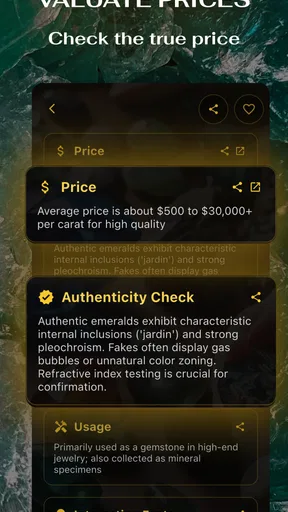
Can the app identify valuable gemstones or determine whether a crystal is genuine?
Rock & Crystal Identifier may suggest what a stone resembles, but it should not be used as a definitive tool for pricing, authentication, grading, or detecting treatments and imitations. Gemstones can require specialized equipment to evaluate hardness, refractive index, density, inclusions, and origin. If you believe you have found an expensive gem or an unusual mineral, keep the specimen safe and obtain an independent opinion from a qualified gemologist, appraiser, or geological laboratory.


